Last night the protagonist in our latest book had a momentary regret just before she lapsed into unconsciousness. She could have done so much …
“You always give your characters momentary regrets,” Sherylyn said. “It’s a pet phrase of yours. Tegan, in Potion¸ has a momentary regret because she doesn’t get to work with Alun. Acquard has a momentary regret about Gardiner. Even Ean has a momentary regret in Linesman.” (Or had, I’m not sure if she made me take that one out.)
“Apart from the fact that you’re telling, not showing, it’s a pet phrase. Get rid of it.”
If I don’t get rid of it, she will, and we’ll work together to convey the same meaning—without the momentary regret—or get rid of it altogether if we don’t need it. I suspect it will go altogether. The story doesn’t need it.
That’s the value of a co-writer.
Even a good alpha or beta reader can point out pet idiosyncrasies.
I have other pet writing habits. I’ve blogged before about names. If I’m naming the characters you can usually pick who’s the good guy and who’s the bad just by their name.
So far, incidentally, we have two Fergus’s and one Feargal (and I think they’re unique every time) and I’ve lost count of how many Caterina’s.
I’m not the only one who does that, by the way. One of my favourite authors loves the names Connor and Jake. If they’re in a book I know they’re the good guy or the love interest. Never the bad guy.
I’m thinking of trying to convince Sherylyn we should do a Hitchcock. His trademark was to put himself into every movie. Why can’t we have a trademark? Each of our characters will have a momentary regret.
The question was posed in a local writers’ magazine.
A friend has just published her first book and has invited me to the book launch. I don’t read in her genre. Do I have to buy the book?
The answer, from an author who had published a number of books, and is respected in the industry, was:
Of course you should buy the book. You’re there to support your friend.
I understand this is what is expected, but I disagree. Totally.
Given the above answer, I expect that friend will make an excuse and not go to the book launch at all.
What makes a successful book launch?
Buzz. What makes a buzz? People.
If I was the questioner’s author friend, I’d just be happy my friend came along to support me. A common writer’s nightmare is the book launch or book signing or book talk where no-one turns up. (Signing in the Waldenbooks, anyone?) The best support your friends can give you is to come.
Not to buy your books.
A lot of my friends don’t read science fiction or fantasy. I don’t expect them to buy our books. If I was doing a book launch I’d be just as happy if they came along. If I’m launching or signing in a bookstore and they felt obligated to buy a book they should buy one they want to read. I’m happy, I get the crowds. The bookstore’s happy, they get a sale. The two combined means it’s more likely they’ll invite me back.
There are some friends whose books I’ll buy when they get published because I want to support them. But I don’t think one should ever go to a book launch feeling obligated to buy the author’s book.
Word and Scrivener are not the same. They are both writing tools that will help you craft novels. They produce a similar end result. A novel.
Scrivener is a content generation tool for writers. Word is a word processor.
Scrivener started out as a Mac program, Word as a Windows program, so users used to divide along the lines Windows users used Word while Mac users used Scrivener (or a Mac word processor). Nowadays, both programs work for both types of operating systems, so it’s more a case of preference.
Many of the things you do in one program can be done in the other, even if not the same way.
Scrivener was designed for novel writing, while Word is a general purpose word processor. You can write letters or reports on it just as easily as you can write novels. So I imagine that many novelists would find Scrivener useful and easy to use. Especially if you’re a plotter. Almost certainly if you already use index cards or similar to plan out your stories.
Me, I use Word. I’m a Word guru from way back, a Microsoft user all the way. I’m also a pantser—or as Brandon Sanderson calls it, a gardener (he borrowed the term from George R. R. Martin). I’m happy to let my words flow. I go back and rewrite along the way, and move big chunks of text around while I do it. I like having the whole book in one document.
My co-author, Sherylyn, uses both. Scrivener when she’s planning out a story, or writing non-linearly, Word when she’s just letting the story flow.
Neither program is necessarily better than the other. Both have good and bad points. It’s what works for you and the way you write.
Why, oh why does that snappy one-liner we worked so hard to come up with always sound so lame when someone asks, “So, what’s your book about?”
You’ve spent countless hours trying to come up with something that works, and all that comes out of your mouth is an almost inarticulate, “Well, it’s a space opera about a guy who repairs spaceships and gets caught up in the discovery of an alien spaceship that two warring factions in the galaxy both believe can help them to win a war.”
Which is technically correct and absolutely nothing like the book at all.
You can see the poor listener’s eyes glaze over. “Oh,” they’ll say, and the conversation stops dead.
That’s the most common reaction, but we’ve had others. A close second is, “So what’s a space opera?”
I’ve got the answer to that one down pat. “Think Star Wars. Space, spaceships, fighting, politics, a little bit of humour.”
The poor listener’s eyes glaze over. “Oh,” they say, and the conversation stops dead.
It’s amazing the amount of in-words we use, that we don’t even realise we’re using. I take ‘space-opera’ for granted. It always pulls me up short when I realise most people don’t have the foggiest idea what I mean.
Then there’s the standard double-take. “You don’t look like you write science fiction.”
What does a science fiction writer look like?
One of my favourites though, was from an editor who works for one of our local science fiction/fantasy imprints for one of the big five publishers who Sherylyn was talking to one day. “It’s a space opera. Think Lois McMaster Bujold.” We lifted the Bujold reference straight from our agent. We’d never have come up with it ourselves, even though we can see why she mentions it.
“Who?” asked the editor, and the conversation stopped dead.
There’s a standard novel manuscript format and it goes something like this:
A4 or letter paper
Times New Roman 12 pt
2.5 cm or 1 inch margins
Double spacing
Indent the first line of each paragraph 1 cm or half an inch
No extra space between paragraphs
Author, title and page number in the top right-hand corner of each page
Begin new chapters on a new page.
Letter/1 inch/half inch are for countries that use imperial units, A4/2.5cm/1cm for those that use metric.
Most writers set this up every time they start a new story in Word. But you don’t have to. If you use a template you will turn out consistently formatted novels every time without having to do any manual setup.
Where to get templates
Microsoft has some standard manuscript formatting templates already set up. Or you can create your own. Today, I’ll show you how to find Microsoft’s preformatted templates. Next time I’ll show you how to create your own from scratch.
Preformatted templates using Office 2013
I’m using Office 2013. If you’re using an earlier version of Word, you can do a similar thing, the actual steps may not be quite the same.
Open Word
This opens on the template page
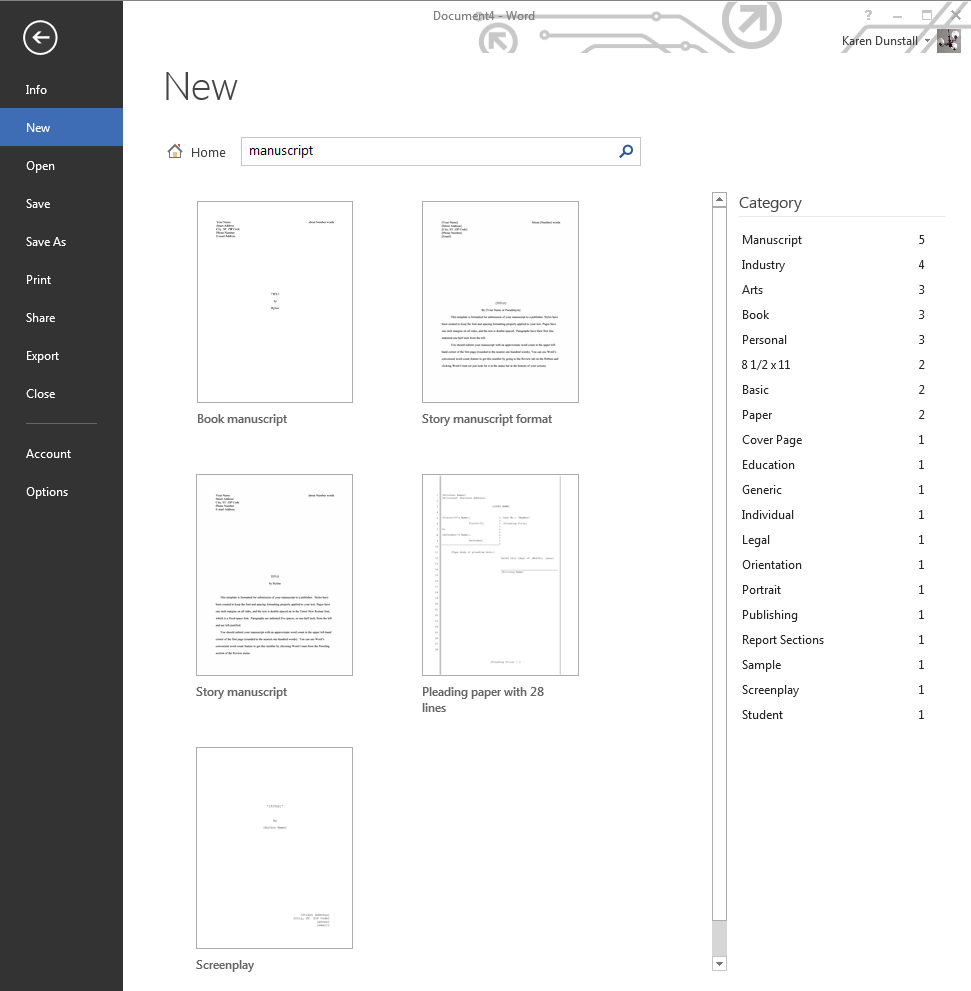
Type manuscript into the search field and start searching (press <Enter> or click on the magnifying glass)
This brings up five potential templates you can use. The three that look most promising are:
Book manuscript
Story manuscript format
Story manuscript
Results from a template search using ‘manuscript’ as the search term
Let’s look at each of them in turn.
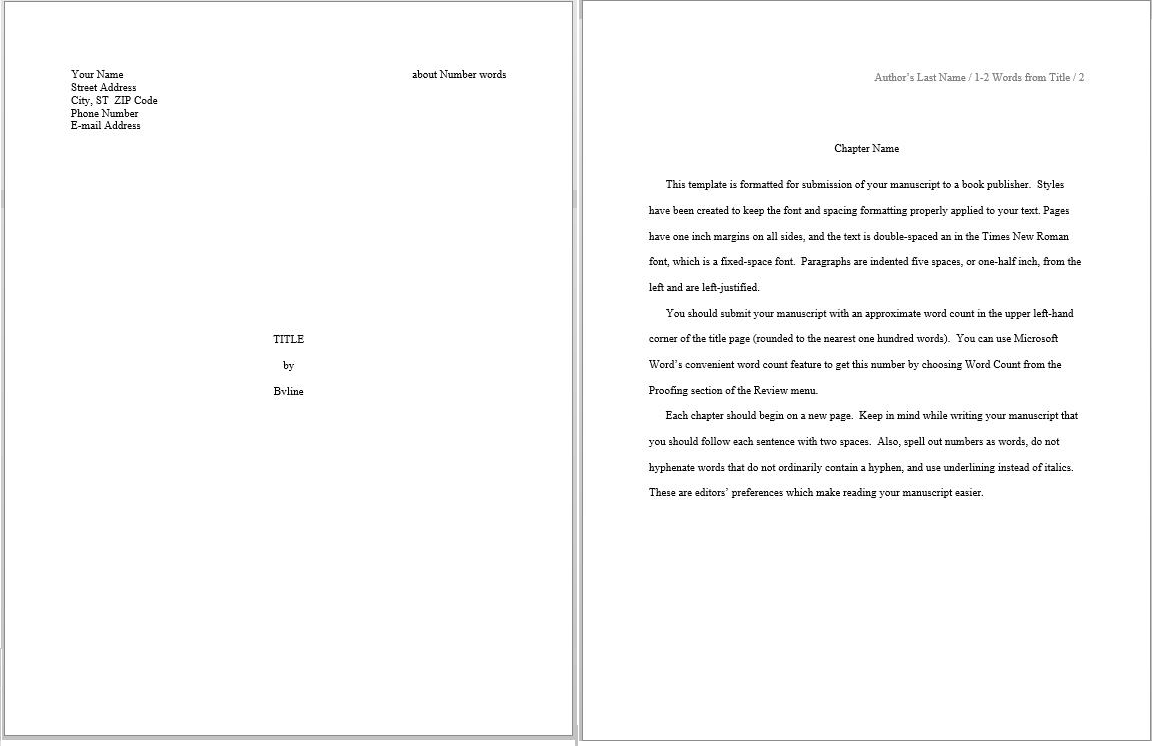
Book manuscript
Book manuscript template. This is the only template that includes a front page
Book manuscript looks good. Inspecting it I can see that:
It’s letter size. Good for the US market, and I can easily change this to A4 if I’m in a metric country
It has all the author information you need on the front page
The header contains the story name, author name and page numbers
Text is 12 point Times New Roman
Margins, strangely enough, pick up my metric 2.5cm. Again, that’s easy to change
Text is double spaced
Chapter name is styled and defined as a heading type
So far, I’m liking it. Now I’ll put on my Word guru hat and look more closely.
What don’t I like about it?
There’s no line indent for the start of each paragraph. That means you have to tab in at the start of each paragraph. You shouldn’t have to do that.
Chapter name is not in the Style Gallery, so how does the poor inexperienced writer know how to use it
Things I’m ‘meh’ about but that only impact me (in other words, personal preference)
It overrode my default dictionary
It uses content controls for the first page, in the header and in the chapter title but they don’t seem to do anything. (Think of content controls as fields you can fill in, like a form.)
Outside of that, it’s definitely something you could use if you wanted to be up and running fast.
Story manuscript
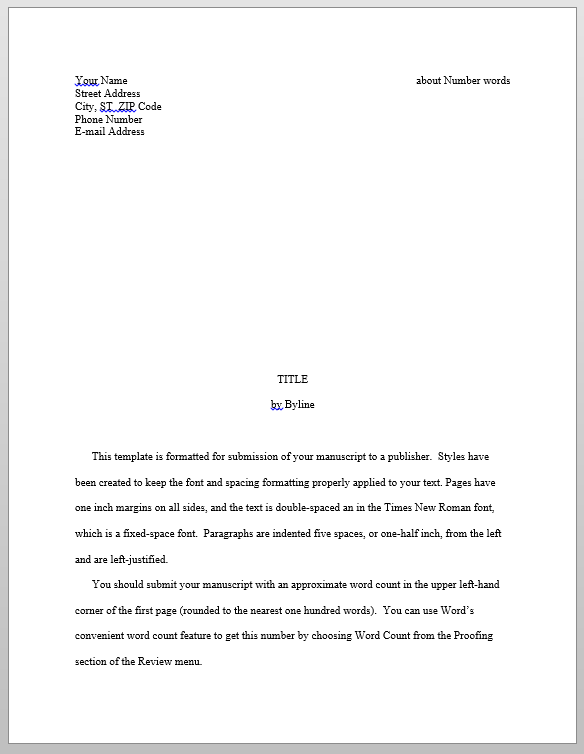
Let’s look at the story manuscript template next. This one doesn’t have a front page. I’d consider this more of a short story manuscript.
Story manuscript. Behind-the-scenes, this setup is similar to the Book Manuscript template.
It looks similar to book manuscript template except that it doesn’t have a chapter title style. I’d guess that it was created by the same person, or that one was based off the other.
It has the same issues as book manuscript template. The biggest of these is needing to tab at the start of every paragraph.
Story manuscript format
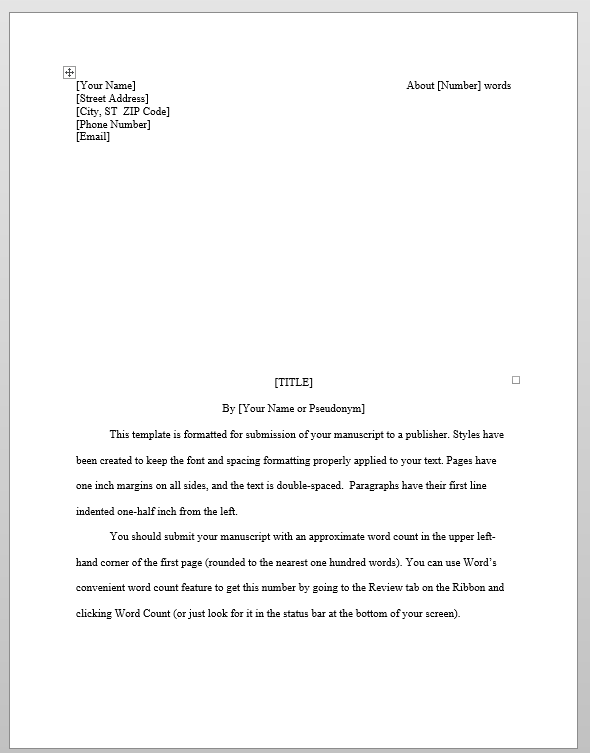
At first glance story manuscript format looks almost the same as the story manuscript template. It’s not.
Again, it’s more suited to a short story than to a novel because I think that for a novel a title page is good. The styles are very basic.
Story manuscript format template. Looks similar, but it’s not.
I like:
Finally, yes, indented first paragraph, so you don’t have to tab to start each paragraph. You cannot imagine how much time this will save you
The styling is basic, but it works. (Note however, that if you’re writing a novel, when you add your title page you’ll have a couple of problems with basic styling. I’ll get to that in another blog)
Meh about:
The name and address at the top of the first page are in a table
Plus it overwrote my default dictionary again.
The verdict
If I had to recommend a template, I’d use the story manuscript format. For one reason, and one reason alone. Indented first line.
There are things you can do to customise the templates, but that’s for another blog.