Categories
On writing

Chris Hadfield: a valuable resource for science fiction authors

Commander Chris Hadfield is the best thing to have happened to the western space program since the moon landing.

It’s not just in the stunning photographs he sent back from space, or the demonstrations of everything from how to eat a sandwich to what happens when you cry in space. It was the sheer accessibility of everything and the sense of wonder he brought with it. Sometimes we humans get so jaded we think there is truly nothing new under the sun. Then we see Chris Hadfield show us what it’s like to cry in space and that sense of wonder returns.

For science fiction writers, Hadfield is also a truly accessible source of research that we wouldn’t normally have access to.

For me, some of the most fascinating facts have come out of Hadfield’s interviews on his return to earth. In particular, CSA’s first interview with Canadian journalists, and Maclean’s The Wonder of Chris Hadfield, where he talks about, among other things, how long periods in weightlessness emulates the symptoms of aging.

Coming back to Earth there was dizziness. His body doesn’t remember how to get blood back to head, so he has to wear a G-suit to push it back up. He hasn’t held his head up for five months, so his neck and back are sore. He is tottering around like an old man. His blood vessels have hardened and his cardiovascular system has changed. His bones have lost calcium.

He is, in fact, displaying many of the symptoms of old age.

When he lays down on the mat to do exercises, it feels like two people are laying on top of him, that someone is squeezing him into the floor.

After Hadfield landed he could feel the weight of his lips and tongue and had to change the way he talked. He hadn’t realised he had learned to talk with a weightless tongue.

Weightlessness is a superpower. You can fly.

Right now he is trying to learn how to walk again.

He has to sit down in the shower so he doesn’t faint or fall down. He doesn’t have callouses on his feet, so it’s like walking on hot coals.

Hadfield brings these symptoms to life. He talks frankly about them and the impact they have on him.

For a science fiction writer, he’s a dream. It’s as close as you can get to being in space yourself without actually going there.

Not only that, it makes you think about how you write your own space scenes. For example, I’m really glad that in the Linesman series we chose to give our spaceships artificial gravity, because given the above symptoms there’s no way our spacers could do the things they are doing in the story if they didn’t have it.

In Linesman II our POV character rescues someone who has spent six months drifting in space in an emergency pod.  Let me tell you, Griff’s symptoms are going to change.
Categories
Writing tools

Farewell to a great little workhorse

My netbook died, almost four years to the day I bought it.

It was a great little computer, ideal for writing on my work commute and at lunchtimes, and it freed up my writing so much I will be forever grateful I bought it. I have done some of my best writing to date on that little machine.

It had been sending out warning signals for weeks. It wouldn’t even turn itself off any more when you closed the lid. I had to pull out the battery every time I closed the lid. Then one day it simply wouldn’t turn on. Or rather, it turned on because I could hear the fan working and see the lights, but nothing came up on the screen. Nor could I plug it into the network with an Ethernet cable and access the disk.

So, finally time for a new laptop.

I wanted a netbook. First, because they’re cheap and the computer I carry around really is only a word processor. I don’t even access the internet on it. Second, because netbooks are small and light. It had to pass the handbag test. Could I fit it into my handbag?

Off I went shopping.

I wanted an Acer Aspire One. I’d been more than satisfied with the one I’d had for the last four years.

“We stopped selling those in January,” the salesman said. “We don’t sell netbooks any more.”


Four years of netbooks.
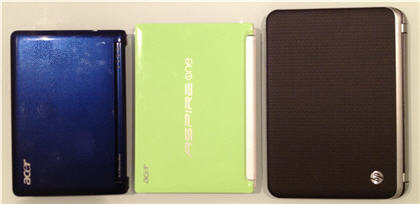
Four years of netbooks. You’d think that the one on the left was newer, because it was smaller (well you would if you didn’t see how well-used it was) but no, the blue netbook is four years old, the green one two (another Acer Aspire One) and the monster on the right is brand new.


Categories
Writing tools

I feel a migraine coming on

The first thing you notice about Office 2013/365 is that it is very, very white. Migraine-inducing white in our family.

I can see that on a smaller screen like an iPad the white would be good. Not too much clutter.

I, however, have two 24″ screens and that makes for a lot of white space. The washed-out scheme led to eye-strain and headaches.

The first thing I did was add as much colour as I could by giving the screen as much contrast as I could. There isn’t much to choose from. White (default), light grey and dark grey.

Here’s how to change it.

  • Click on the File menu
  • Choose Options
  • Choose General options
  • Change your scheme to Dark Grey

Believe me, dark grey is much better than white.


Categories
Writing process

You’re taking over our story

Rossi, Rossi, Rossi. What are you doing to us? You’re taking over our story.

It’s not your story.

It’s Acquard’s story. And Tommy’s story. Plus a couple of side tales about Professor Gryffdd Tan and your old boss, Leo Rickenback. You remember Rickenback, don’t you? The man who sold your contract to the enemy. You hate him. At least, you’re supposed to. And he did reputedly try to poison you, even if you yourself said he wouldn’t have the balls to do it.

I repeat. It’s not your story.

So what are you doing taking over?


It’s not even the first time you’ve tried it. You did it before, in our first book in this series.

I’ve got news for you. No-one liked you. They skipped over your parts. We kept chopping you down, again and again. In the last edit we took out nearly 10,000 of your words. By the end of that rewrite you were just a shadow of your former self.

Now you’re doing it again.

We have already chopped out 20,000 of your words in this novel, and I can see another 20,000 going, maybe more.

I say again. This is not your story.


Let me tell you some facts.

You’re arrogant and opinionated. You’re the master of the verbal put-down. You’re politically ambitious and don’t care who you trample on your way to the top. You have an extremely high opinion of yourself and your abilities. In short, you are not someone we want to spend a whole book with. And let’s be honest, you’re so full of yourself you really have nothing to say. You’re only in this book because Acquard needs a linesman and you’re the only one around.

I don’t know how you manage to weasel your way into where the action is, but you’re always there.

We definitely don’t want to hear about it from your point-of-view.

Sorry Rossi. But you’re going. Again.

Categories
Writing tools

Microsoft Office 2013: Should you buy or rent?

What’s the difference between Office 365 and Office 2013?

Or rephrased, should you buy or rent?

A problem I have with Microsoft is that they have great information available but half the time you don’t know it’s there, and even when you do know, you don’t understand what they’re saying until you’ve worked it out for yourself.

And that sentence is about as confusing as I find Microsoft is, but translated it means when you know what they’re talking about the information they provide is good. Before that it may as well be written in another language.

Note too that everything I say here is for the PC. There are some limitations for the Mac. I won’t go into these, as I don’t have a Mac, but be aware that you don’t get everything if you’re running things on Apple.

So, Office 365 and Office 2013?

Underneath, they’re pretty much the same product. The main differences.

Office 2013

  • Buy once, use forever. A flat, one-off price
  • Only use on your own PC
  • Different versions have different products—for example, Office Professional version has Word, Excel, PowerPoint, OneNote, Outlook, Publisher and Access, while Office Home and Student has Word, Excel, PowerPoint and OneNote. There’s a full list of versions on Microsoft’s Which Office is Best For You page. This page also shows Office 365 to compare with

Office 365

  • An annual fee. You pay every year. Effectively, you are renting the software
  • You can use it on up to five computers
  • You get the full Office suite (even if you only use Word)
  • You get some online storage – think Dropbox for Microsoft
  • If you’re on another computer—say an internet café—then you can still use Office (your documents have to be online for this, but it’s still a nice feature) — think GoogleDocs for Microsoft

So think of Office 2013 as your standard Microsoft Office product and Office 365 as standard Office plus the Microsoft equivalent of Google Docs and DropBox. Except that Google Docs and DropBox are free, whereas Office isn’t.

One thing that worried me when I first looked at Office 365 was whether I had to be logged on to use it?

No, and I proved this during my morning and evening train commutes, where I turn off the internet and simply use Word and the PC, and save to my c: drive. Everything worked fine.

Of course, I couldn’t access anything on my skydrive while I was offline, but I expected that.

So why isn’t everyone renting?

On the face of it, Office 365 has so many advantages why wouldn’t you choose it over a standard Office suite?

There are two big minuses.

First, you are renting the software. In 12 months time you have to pay another fee to Microsoft to use it for the next 12 months. You have no control over the price, and you don’t know what’s going to happen. Suppose you don’t have the money to upgrade. Suppose you don’t want to. Microsoft is effectively holding you to ransom here. If you are a writer who only uses Word, and you’re the only one in your household who uses it, why not simply purchase Office 2013 Home and Student. It’s less than the cost of two years’ rental of Office 365.

Also, I’m not a big fan of the cloud, which is Microsoft’s fancy name for online storage. I like to be in control of my data. I don’t like it that someone else has access to my work. Or to some of it, anyway.

Why we chose Office 365

In the end we went for Office 365. We had four PCs between us, which meant we had to buy four licenses anyway, so we factored in that even paying four years’ rental we’d still be better off.

Provided Microsoft keeps their costs down and their licensing model the same.

Plus we do want to share documents. We already do this with OneNote, synchronising across machines, and we love it. We could save something on our c: drive, and next time we joined the network OneNote would synchronise everything.

This was probably the deciding factor.

We’ll let you know how we go.


p.s. As an unexpected bonus, when we upgraded to Office 365 it didn’t delete Office 2007, so the machines with 2007 on them still have valid working versions. If we ever choose to revert back.

Categories
Writing tools

Office 365

My netbook died the other day, almost four years to the day that I bought it. Writing-wise, it’s one of the best purchases I ever made, second only in usefulness to Microsoft Word.

Because I write on two PCs (the netbook and the desktop), and I co-write with another writer who also uses two PCs, we like to keep the software we use in sync. My co-writer and I decided that rather than stay with Office 2007 on my new netbook, we’d upgrade all our PCs to Office 2013.

We ended up upgrading to Office 365, and linked our accounts so that we could share files.

At the same time I’d been toying with starting a journeyman writer blog for writers like us who aren’t beginners any more but aren’t necessarily published writers. They’re consistently writing, may or may not have an agent, and are looking for things like tools and just general information about what happens next. Everything from that dreaded second book, to rewrites at the request of someone else, to the tools that we use and backups and managing files.

I have also noticed that many writers use Apple. The ones who blog about it seem to, anyway. Yet there are a lot of us out there who use Microsoft. Some by choice—I’m one of those—some for whom it’s all they’ve got. But there’s not much out there for Office users, even though I think that most writers probably still write in Word.

Journeyman Writer will be a while off yet, we’re both too busy, but given that we ended up going for Microsoft Office 365, it’s too good an opportunity to pass up to share what we learned from our upgrade. Other writers are no doubt going through the same experiences we are. If even one other writer finds it useful it will be worth it.

We’re keeping it separate from our regular blog, and our regular fortnightly blog takes precedence, but we’ll try and make it semi-regular. Hopefully in the off-weeks of the main blog.

Things I’d like to cover.

Categories
Books and movies

Stilettos and dresses on a two-man five-year mission: you’ve got to be kidding me

Am I the only person who took umbrage at the clothes Victoria wore in the film Oblivion?

I mean, come on. You’re on a five year mission, there’s only ever the two of you, and one of you gets to wear practical coveralls (science-fiction style) while the other wears dresses and stilettos.

You have to be joking.

It looks good, but seriously.

I work from home one day a week. During the day there’s just me and my computer. A bit like Victoria, actually. What do I wear? Socks, a pair of comfortable stretch pants and t-shirts.

Even if they’re the only clothes Victoria has, you tell me she’s going to sit on her own every day for five straight years and not kick off her stilettos. I don’t believe it.

But you know what really gripes me?

Spoilers for Oblivion here, so the rest after the fold.

Categories
On writing

When should you work out your collaboration agreement with your co-author?

Sherylyn and I write as a team.

Back when we signed with our agent we also had to sign a collaboration agreement.

There are a number of standard collaboration agreement samples on the internet, and most major writing organisations have an agreement you can view or purchase. These standard agreements are mostly for a single book. Because we write as a single entity, we wanted an agreement that would cover multiple works, so we wrote our own.

The basics were easy. Decide how much each collaborator gets, who owns the copyright, who signs any papers, how you split the expenses, how your name appears on the book and so on.

It’s catering for the things you don’t expect to happen that cause more trouble.

As Lloyd Jassin says in an article on Absolute Write

Although collaborators might not feel comfortable discussing long-term financial issues or the eventuality of a dispute, or even the death of a co-author, it is always easier and less expensive to deal with these issues up front, rather than later, after a dispute arises.

Absolute Write — Collaboration Agreements in the Publishing Industry by Lloyd J. Jassin

The time to address the major issues confronting contributors and collaborators is before the actual creative process begins.

It was —’fun’ isn’t the right word, ‘interesting’ may be more appropriate—to consider what might happen to our writing in these cases.

There are the standard death and disability clauses. What if one author gets hit by a bus? Does the other author have to finish the book? What do we do about future novels in that case?

There are the other, more unpleasant scenarios to consider as well. What if we split acrimoniously? What if one of us gets a greedy life partner who wants that particular author to keep writing even after the other partner doesn’t, and so on. (Of course, these aren’t more unpleasant than being hit by a bus, but it’s a nasty end to what is currently a good writing partnership.) What if, after the bus incident, the dead person’s life partner wants to okay a d-grade porn movie based on a novel that has already been published?

They’re not questions you can ask when your relationship is already starting to crumble, and they’re definitely not questions that should be answered first-time by the collaborators’ lawyers in court.

If you can’t ask—and answer—questions like this before you start writing together, then you need to seriously ask yourselves whether you are ready to collaborate.

Categories
Writing tools

If you’re shopping for a word processor, don’t overlook Microsoft Word

A few years back I started blogging about SharePoint*. I soon realised that I couldn’t manage that blog, plus this blog, plus writing novels along with a heavy full-time workload. Something had to give, and what gave was SharePoint.

I left the blog open for months after that, because even though it was technically dead there was one post that got a lot of traffic. It was called ‘But what does SharePoint do?’. A lot of people commented on it. Even when I finally deleted the site it was still attracting three or four comments a month.

When I pulled the plug there were over 200 comments. Most of them of stayed on topic, but in between there were a noticeable number of anti-Microsoft rants of the “Big Brother Microsoft is capital-B Bad and don’t touch them” kind, and “It’s a useless product, you don’t need it, open-source products are better”.

Putting aside the fact that most people who use SharePoint don’t get any choice**, Microsoft didn’t get to be a big company by continually producing bad products. And despite all its detractors, if you have a use for it, SharePoint is an impressive product.

Microsoft isn’t the only company that gets bad press. Modern behemoths like Amazon and Google are starting to get a similar response. Even Apple is catching some flak nowadays.

Some people choose not to buy books from Amazon because they don’t like Amazon’s business ethics. Others choose not to buy from the iTunes store because they feel likewise about Apple. And some people choose not to use Microsoft Word because they don’t like Microsoft’s business ethics.

What has this to do with writing, you ask?

It’s about Microsoft Word.

You don’t need Word to write novels. All you need in this day and age is a computer and a text editor. (Note that I didn’t say pen and paper. If you want to sell novels, you have to get that those handwritten notes onto a PC.)

There are lots of word processors out there. You can use anything from Word to Open Office to Google Docs to Pages or dozens more. Many authors, particularly Mac users, love Scrivener, for example.

People come up with lots of excuses for not choosing Word.

  • The WYSIWYG editor gets in the way
  • It has too much functionality that you don’t need
  • It’s too complex
  • It doesn’t separate the writing from the presentation layer

Plus a stack of other reasons that often come across as excuses.

If you are a writer shopping for a word processor to write novels on, there are only three reasons you should not consider Microsoft Word.

  • Your operating system doesn’t support it
  • You can’t afford it
  • You really do hate Microsoft and absolutely refuse to buy anything from them (in which case I imagine you will take equally strong stances against buying things from Apple and Amazon).

Note that I say ‘consider’. That doesn’t mean I think you should automatically go out and buy it, just that it’s one of those programs you should be investigating seriously.

You might find it a better tool than you think.

Because you know what, when you have finally finished agonizing over your manuscript, what are you going to do? You’re going to convert it into a Word document to send on to your agent or your editor.


* SharePoint is a Microsoft program. In their sales brochure Apps4Rent describe how people use SharePoint, which was probably always a better question than what it does.

** In most companies, implementing a program like SharePoint is a decision made by a small group of people and then implemented across the company. Many of those wanting to know about SharePoint are those forced to use it.

For what it’s worth, I like SharePoint. Hence the original blog.

Categories
On writing

If they remade The Terminator today, what’s the one thing they would change?

I watched the movie The Terminator the other night.

Despite it being one of ‘the’ great science fiction movies, I had never seen it before. I enjoyed it enough to watch through to the end but … we’ve come a long way in women’s equality and this movie proves it.

The movie starts well. The bad guys from the future send a (supposedly) indestructible cyborg back to our time to kill one Sarah Connor, a woman does something in our time to save the world. Kyle, one of the good guys from the same future, sacrifices his own future to come back to our time to save Sarah from the cyborg.

Going back in time to kill someone to change the future is a common enough theme in science fiction. It was used both before and after The Terminator.

What isn’t so common nowadays is how Sarah ‘saves’ the world.

How does she do it?

She has a son who leads the revolution that finally overthrows the totalitarian government.

That’s right. Her son saves the world.

It’s one of those paradoxical looping movies. If the terminator hadn’t come after her then Sarah wouldn’t have brought her son up knowing how to fight, and if she hadn’t brought her son up knowing how to fight then said son wouldn’t have been able to defeat the government, so no-one would have been sent back to kill her.

How it happens doesn’t matter. What does matter is that early in the movie Kyle tells her that she saves the world. For having a son who saves them.

I’m pleased to say that if they remade The Terminator today, this is one particular conversation they would drop or rewrite. Sure, tell her the terminator is here to kill her to prevent her son being born. That’s a common science fiction trope, and to most people perfectly acceptable. But don’t tell her she saves the world just because she has a son. Nowadays that isn’t acceptable.

Sometimes, it’s not what you say but how you say it.